



 |
|
 |

|
|
|
| 05-10-2025, 10:07 AM | #1 |
|
BimmerPost Supporting Vendor
3480
Rep 3,626
Posts  |
Any race studio 3 experts around here?
I’m trying to compare a recent session to an older one and my channels have changed (pulling data from the smartycam now vs direct from the DL before). Is there any way to tell it to put two different channels on the same chart? I’ve got BRAKE PRESSURE vs Brake Pressure for example and they show up as separate charts.
__________________
Current '20 AG X7M50 (daily + track tow), M4 GTS (track), '21 X3 M40i (wife)
Recent Past '11 E90 M3 (track), '21 DG X5MC, '22 BG G82, '12 E92 M3 ZCP, '08 E93 M3, '18 F80 ZCP, '04 E46 M3 Cleaning out my garage -- stuff for sale |
| 05-11-2025, 12:27 AM | #2 | |
|
Colonel
 
5576
Rep 2,866
Posts
Drives: '09 E90 M3 - IB
Join Date: Feb 2012
Location: 93 million miles from the Sun
|
Quote:
In this first pic, I have two sessions up from two different AIM devices---an old original Solo DL and a newer Solo 2 DL. And like you, the Pedal Position charts appear as different data on two different charts. The place to change this setting is the little green square in the top right corner. I've circled it. In this first chart, if you click on that green square, you'll see the active option is set to "Set Plot Type to Tiled". (I've also highlighted over on the left side to show how the pages look different after a certain option is chosen below.) 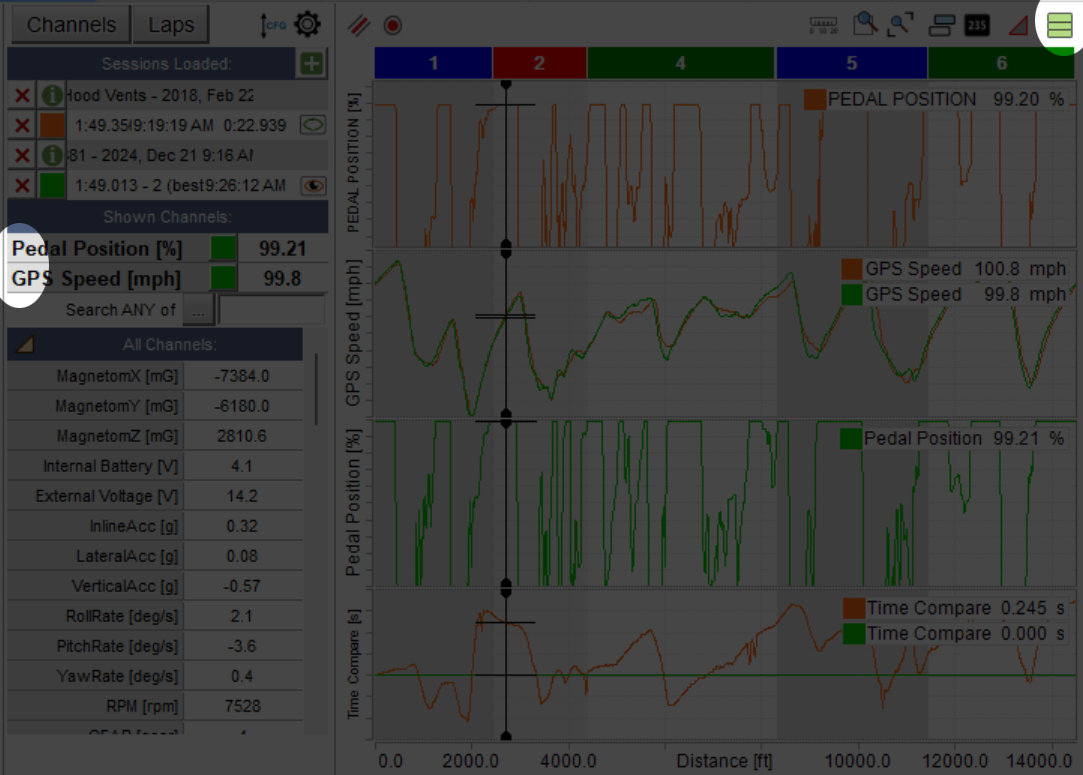 What you need to do is click back on that green block and select "Set Plot Type to Mixed". In this second photo, I have the Mixed option selected. And you can see that the two Pedal Position charts are overlapped. The way you get them to overlap onto the same chart is highlighted on the left side. Once you select the Mixed option, those numbers appear to the left of the Channel names. Clicking on those numbers increments the numbers from 1-6 (you can have up to 6 charts active). So, you need to click on the lap you want to control the chart on, click the number next Channel until they are the same for both parameters and they'll overlap. 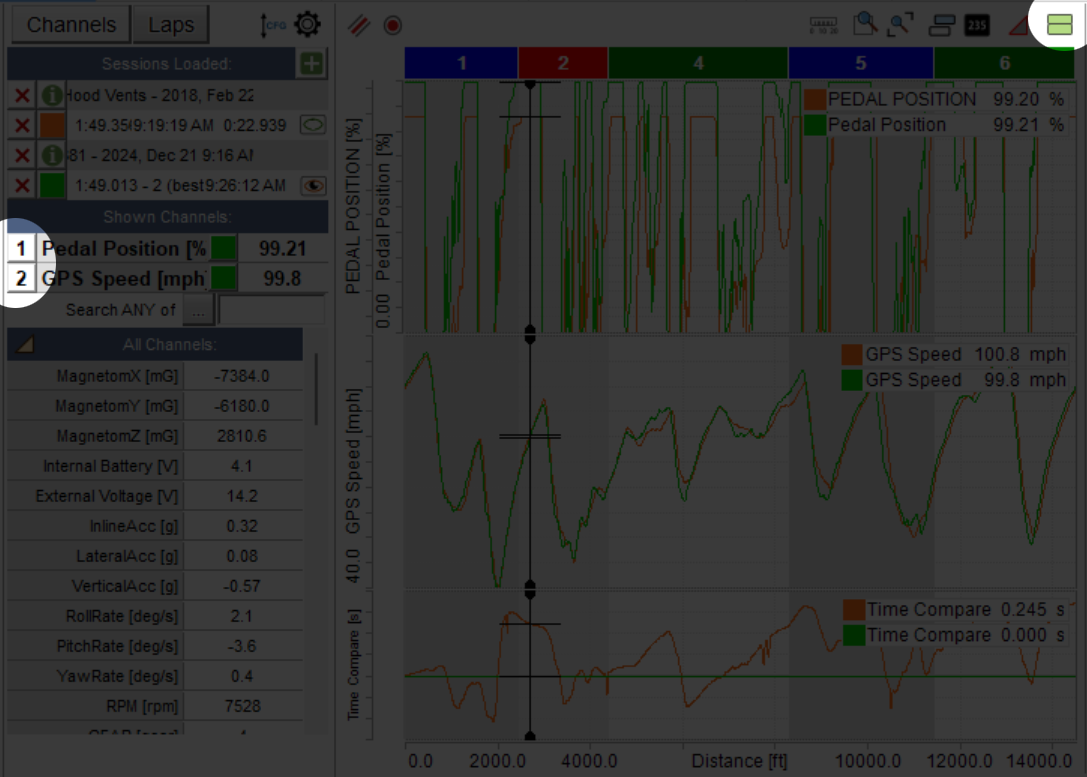
__________________
|
|
| 05-11-2025, 09:00 AM | #3 | |
|
BimmerPost Supporting Vendor
3480
Rep 3,626
Posts |
Quote:
__________________
Current '20 AG X7M50 (daily + track tow), M4 GTS (track), '21 X3 M40i (wife)
Recent Past '11 E90 M3 (track), '21 DG X5MC, '22 BG G82, '12 E92 M3 ZCP, '08 E93 M3, '18 F80 ZCP, '04 E46 M3 Cleaning out my garage -- stuff for sale |
|
|
Appreciate
1
DrFerry10035.50 |
| 05-11-2025, 04:20 PM | #4 |
|
Colonel
5576
Rep 2,866
Posts
Drives: '09 E90 M3 - IB
Join Date: Feb 2012
Location: 93 million miles from the Sun
|
Yeah…..Race Studio was never known for being easy to use unfortunately. It is powerful, and it can be configured in various ways, and you can create custom math equations to do interesting data analysis, but figuring it all out requires a bit of a learning curve.
To their credit though, they have great and friendly support teams on the East and West coasts that are happy to help—-easily reachable on the phone. I’ve learned a lot from them. At the end of the day, their device ties into the CAN bus and gives you incredible data to look at. No one else can hold a candle to that at a similar price range. |
|
Appreciate
1
kolosy3480.00 |
| 05-12-2025, 04:02 PM | #5 |
|
BimmerPost Supporting Vendor
3480
Rep 3,626
Posts |
ok, one more dogbone since you clearly know what you're doing. so I've got a SmartyCam 3 Corsa, in slave mode to the 2 DL, and the DL is hard wired into the CAN bus. I find it easier (and faster) to just pull the SD card from the camera than to do the WiFi upload from the DL. If I do do the wifi upload from the dl at a later date, will it duplicate the sessions or is it smart enough to recognize and just augment the missing data?
that was what happened here -- I've had the DL for a while, but got the cam this season, so i still do have the old channels being recorded.
__________________
Current '20 AG X7M50 (daily + track tow), M4 GTS (track), '21 X3 M40i (wife)
Recent Past '11 E90 M3 (track), '21 DG X5MC, '22 BG G82, '12 E92 M3 ZCP, '08 E93 M3, '18 F80 ZCP, '04 E46 M3 Cleaning out my garage -- stuff for sale |
|
Appreciate
0
|
| 05-12-2025, 04:22 PM | #6 | |
|
Colonel
5576
Rep 2,866
Posts
Drives: '09 E90 M3 - IB
Join Date: Feb 2012
Location: 93 million miles from the Sun
|
Quote:
Seems like a pretty easy thing to try though.
__________________
|
|
|
Appreciate
0
|
| 05-12-2025, 04:39 PM | #7 | |
|
BimmerPost Supporting Vendor
3480
Rep 3,626
Posts |
Quote:
__________________
Current '20 AG X7M50 (daily + track tow), M4 GTS (track), '21 X3 M40i (wife)
Recent Past '11 E90 M3 (track), '21 DG X5MC, '22 BG G82, '12 E92 M3 ZCP, '08 E93 M3, '18 F80 ZCP, '04 E46 M3 Cleaning out my garage -- stuff for sale |
|
|
Appreciate
0
|
| 05-12-2025, 09:05 PM | #8 |
|
Colonel
5576
Rep 2,866
Posts
Drives: '09 E90 M3 - IB
Join Date: Feb 2012
Location: 93 million miles from the Sun
|
You know what I did when I first got my AIM—-I setup a “track” that had the start/finish line as my driveway, and the course was simply around the block. That allowed me to drive a few “laps” and learn about the device. And then, of course, I deleted all that nonsense after I was done experimenting. Don’t see why that wouldn’t work in this case.
|
|
Appreciate
1
kolosy3480.00 |
| 05-13-2025, 08:49 AM | #9 | |
|
BimmerPost Supporting Vendor

865
Rep 893
Posts |
Quote:
|
|
|
Appreciate
1
kolosy3480.00 |
Post Reply |
| Bookmarks |
|
|


