
Cyberdemon wroteI just forgot the iDrive bluetooth entirely and it works perfectly now! Thanks so much for this thread. It really helped! I also had a red screen like another user here and I ended up without the idrive harness and connecting A->B!Is the correct source selected? IE are you expecting sound but aux isn't defaulted to on?
Have you tried forgetting the IDrive Bluetooth audio entirely?
624.4KVIEWS
737REPLIES
132APPRECIATES
06-05-2025LAST POST
bighindu79 wroteI think this is a super helpful post and I have never used CarPlay, nor do I plan on getting an iPhone, but the comparison is great.Out of curiosity I've been using Android Auto instead of CarPlay for the past month. I am posting my experience here for any android only person considering this retrofit.
Overall, Apple's implementation is far superior in my opinion but with the recent updates to AA (i.e. AA split screen for screens 7"+) the experience is getting better.
My carsara installation:
1. Not using the iDrive harness. Connected carsara connection A to B.
2. Coded to get AUX audio through quadlock.
What I don't Like:
1. When I get in the car and start it up. AA is slower to startup compared to CarPlay. Sometimes, it would take up to a minute to startup. During this time, the iDrive screen would be pitch black. Sometimes, it would even timeout connecting and I would have to go on the phone to restart the connection. Never had any of these issues with CarPlay.
2. Once it started up, I had to hold the Menu button down to switch over to the carsara and then confirm the stupid android prompt to start AA and then the AA dashboard would show up. Again, never had to do any of this with CarPlay.
3. I can't navigate the UI with the iDrive menu,option, and back buttons. I have to use the IDrive controller wheel to navigate and select. This is the most annoying part for me as this really makes navigating cumbersome especially when you want to switch to another app or navigate within an app. Again, in CarPlay all buttons work to navigate around and makes the experience that much better.
Other than the issues mentioned above, I think AA with Carsara works just fine. I don't have any sound or mic issues. Google assist responds with the steering wheel button. AA has better wallpaper options if that's something you care about. The new split screen update looks pretty good on our 8.8" CIC screen but probably would look better with the newer wider screens. Apple's dashboard is still far superior as it uses the screen real estate more efficiently.
With that, I think I'll be going back to CarPlay as my default and keep tinkering as AA releases updates. I'll post back with any new findings.
What stupid AA pop are you getting? I have never had a pop on AA that I had to click through.
I do hate that I have to hit the menu button for three seconds to get the Carsara box up, are you saying that you never need to do that with CarPlay? For some reason I never had to do that with AA when I first installed but need to all the time now.
I also tried to code the quad lock but for some reason I only have CDMM_AUX_HU and CDMM_USB_AUDIO_SINGLE but coding them didn't do anything it seemed.
GTiceman wrotewhen I get in the car and start it up and switch to the carsara screen, there is a pop-up waiting asking to confirm to connect to AA with my Android phone's name (Galaxy S9) displayed. I have to press the idrive wheel down to confirm and thats when the AA dashboard shows up. Not sure if there is a setting to disable this confirmation. if there is please do share.bighindu79 wroteI think this is a super helpful post and I have never used CarPlay, nor do I plan on getting an iPhone, but the comparison is great.Out of curiosity I've been using Android Auto instead of CarPlay for the past month. I am posting my experience here for any android only person considering this retrofit.
Overall, Apple's implementation is far superior in my opinion but with the recent updates to AA (i.e. AA split screen for screens 7"+) the experience is getting better.
My carsara installation:
1. Not using the iDrive harness. Connected carsara connection A to B.
2. Coded to get AUX audio through quadlock.
What I don't Like:
1. When I get in the car and start it up. AA is slower to startup compared to CarPlay. Sometimes, it would take up to a minute to startup. During this time, the iDrive screen would be pitch black. Sometimes, it would even timeout connecting and I would have to go on the phone to restart the connection. Never had any of these issues with CarPlay.
2. Once it started up, I had to hold the Menu button down to switch over to the carsara and then confirm the stupid android prompt to start AA and then the AA dashboard would show up. Again, never had to do any of this with CarPlay.
3. I can't navigate the UI with the iDrive menu,option, and back buttons. I have to use the IDrive controller wheel to navigate and select. This is the most annoying part for me as this really makes navigating cumbersome especially when you want to switch to another app or navigate within an app. Again, in CarPlay all buttons work to navigate around and makes the experience that much better.
Other than the issues mentioned above, I think AA with Carsara works just fine. I don't have any sound or mic issues. Google assist responds with the steering wheel button. AA has better wallpaper options if that's something you care about. The new split screen update looks pretty good on our 8.8" CIC screen but probably would look better with the newer wider screens. Apple's dashboard is still far superior as it uses the screen real estate more efficiently.
With that, I think I'll be going back to CarPlay as my default and keep tinkering as AA releases updates. I'll post back with any new findings.
What stupid AA pop are you getting? I have never had a pop on AA that I had to click through.
I do hate that I have to hit the menu button for three seconds to get the Carsara box up, are you saying that you never need to do that with CarPlay? For some reason I never had to do that with AA when I first installed but need to all the time now.
I also tried to code the quad lock but for some reason I only have CDMM_AUX_HU and CDMM_USB_AUDIO_SINGLE but coding them didn't do anything it seemed.
to your second question, yes, when using Carplay, as soon as I get in and start the car the carplay dashboard is up and ready to go. No holding down menu button to switch over or confirm any pop-up.
This has been working great for me for two months now. There are small bugs but that can be fixed by simply restarting the module (e.g., Waze freezing up).
Other than that it's a solid product! Buy with confidence!
Other than that it's a solid product! Buy with confidence!
bighindu79 wroteI tried looking through settings and didn't see anything, might be a Samsung specific item. Sorry can't help with that but perhaps I could look for my old S8 and see if it happens on that device.when I get in the car and start it up and switch to the carsara screen, there is a pop-up waiting asking to confirm to connect to AA with my Android phone's name (Galaxy S9) displayed. I have to press the idrive wheel down to confirm and thats when the AA dashboard shows up. Not sure if there is a setting to disable this confirmation. if there is please do share.
to your second question, yes, when using Carplay, as soon as I get in and start the car the carplay dashboard is up and ready to go. No holding down menu button to switch over or confirm any pop-up.
GTiceman wrotethanks. I tried as well and scoured Google but came up empty. if you find anything, let me know. I'll take a picture of the pop up next time I'm in the car.bighindu79 wroteI tried looking through settings and didn't see anything, might be a Samsung specific item. Sorry can't help with that but perhaps I could look for my old S8 and see if it happens on that device.when I get in the car and start it up and switch to the carsara screen, there is a pop-up waiting asking to confirm to connect to AA with my Android phone's name (Galaxy S9) displayed. I have to press the idrive wheel down to confirm and thats when the AA dashboard shows up. Not sure if there is a setting to disable this confirmation. if there is please do share.
to your second question, yes, when using Carplay, as soon as I get in and start the car the carplay dashboard is up and ready to go. No holding down menu button to switch over or confirm any pop-up.
Had my Carsara initially working now getting red screen when switching over. Checked connections and the normal drive screen works. Any ideas?
Hey guys,
Great to read all your tips & tricks for installing and using the Carsara system.
I have a E91 LCI CIC Navi Pro and was planning on installing the Carsara (or Kremersino) unit
I contacted the Carsara store with the following questions:
1. Does the CarPlay menu start automatically when starting the car?
Answer Carsara: “No, always have to push the menu
2. does your system support my rear radar when using an after market camera?
Answer Carsara: support this function for cars after year 2013
3. Does the CarPlay system automatically switch to OEM radar when reversing?
Answer Carsara: if no camera, it will not show parking radar when you reverse when screen is in carplay
What are your findings on this?
I asked Kremersino the same questions, and the do support al the options I asked about.
Thanks in advance ! 🙏
Great to read all your tips & tricks for installing and using the Carsara system.
I have a E91 LCI CIC Navi Pro and was planning on installing the Carsara (or Kremersino) unit
I contacted the Carsara store with the following questions:
1. Does the CarPlay menu start automatically when starting the car?
Answer Carsara: “No, always have to push the menu
2. does your system support my rear radar when using an after market camera?
Answer Carsara: support this function for cars after year 2013
3. Does the CarPlay system automatically switch to OEM radar when reversing?
Answer Carsara: if no camera, it will not show parking radar when you reverse when screen is in carplay
What are your findings on this?
I asked Kremersino the same questions, and the do support al the options I asked about.
Thanks in advance ! 🙏
FloorBeamer wrote1. My car will switch to CarPlay as long as it detects my phone and I was using carplay last.Hey guys,
Great to read all your tips & tricks for installing and using the Carsara system.
I have a E91 LCI CIC Navi Pro and was planning on installing the Carsara (or Kremersino) unit
I contacted the Carsara store with the following questions:
1. Does the CarPlay menu start automatically when starting the car?
Answer Carsara: “No, always have to push the menu
2. does your system support my rear radar when using an after market camera?
Answer Carsara: support this function for cars after year 2013
3. Does the CarPlay system automatically switch to OEM radar when reversing?
Answer Carsara: if no camera, it will not show parking radar when you reverse when screen is in carplay
What are your findings on this?
I asked Kremersino the same questions, and the do support al the options I asked about.
Thanks in advance ! 🙏
2. This works fine for all CIC cars. My 2011 with camera displays the PDC sensors.
3. Can't confirm this because I have a camera. If I go into reverse before the box has completed booting then I will still get the standard BMW PDC screen.
Cyberdemon wrote1. I have the same experience. As long as the iPhone is detected and connected to CarPlay, I don't have to switch screens by holding down the menu button. Not the case with android auto though as I mentioned in my earlier post.FloorBeamer wrote1. My car will switch to CarPlay as long as it detects my phone and I was using carplay last.Hey guys,
Great to read all your tips & tricks for installing and using the Carsara system.
I have a E91 LCI CIC Navi Pro and was planning on installing the Carsara (or Kremersino) unit
I contacted the Carsara store with the following questions:
1. Does the CarPlay menu start automatically when starting the car?
Answer Carsara: "No, always have to push the menu
2. does your system support my rear radar when using an after market camera?
Answer Carsara: support this function for cars after year 2013
3. Does the CarPlay system automatically switch to OEM radar when reversing?
Answer Carsara: if no camera, it will not show parking radar when you reverse when screen is in carplay
What are your findings on this?
I asked Kremersino the same questions, and the do support al the options I asked about.
Thanks in advance ! 🙏
2. This works fine for all CIC cars. My 2011 with camera displays the PDC sensors.
3. Can't confirm this because I have a camera. If I go into reverse before the box has completed booting then I will still get the standard BMW PDC screen.
Can't comment on 2 or 3 as I don't have a camera.
gazosnic wroteThe red screen usually indicates a bad connection. If it's intermittent you may want to check the cable routing and see if anything is getting pinched during reassembly? If it worked then stopped it means everything is plugged in correctly.Had my Carsara initially working now getting red screen when switching over. Checked connections and the normal drive screen works. Any ideas?
Cyberdemon wroteThanks guys for the info!1. My car will switch to CarPlay as long as it detects my phone and I was using carplay last.
2. This works fine for all CIC cars. My 2011 with camera displays the PDC sensors.
3. Can't confirm this because I have a camera. If I go into reverse before the box has completed booting then I will still get the standard BMW PDC screen.
Helpful and good info to make a decision
Hey guys, I'm new here and proud new owner of a '13 M3 E92!
Couple extra tips I found:
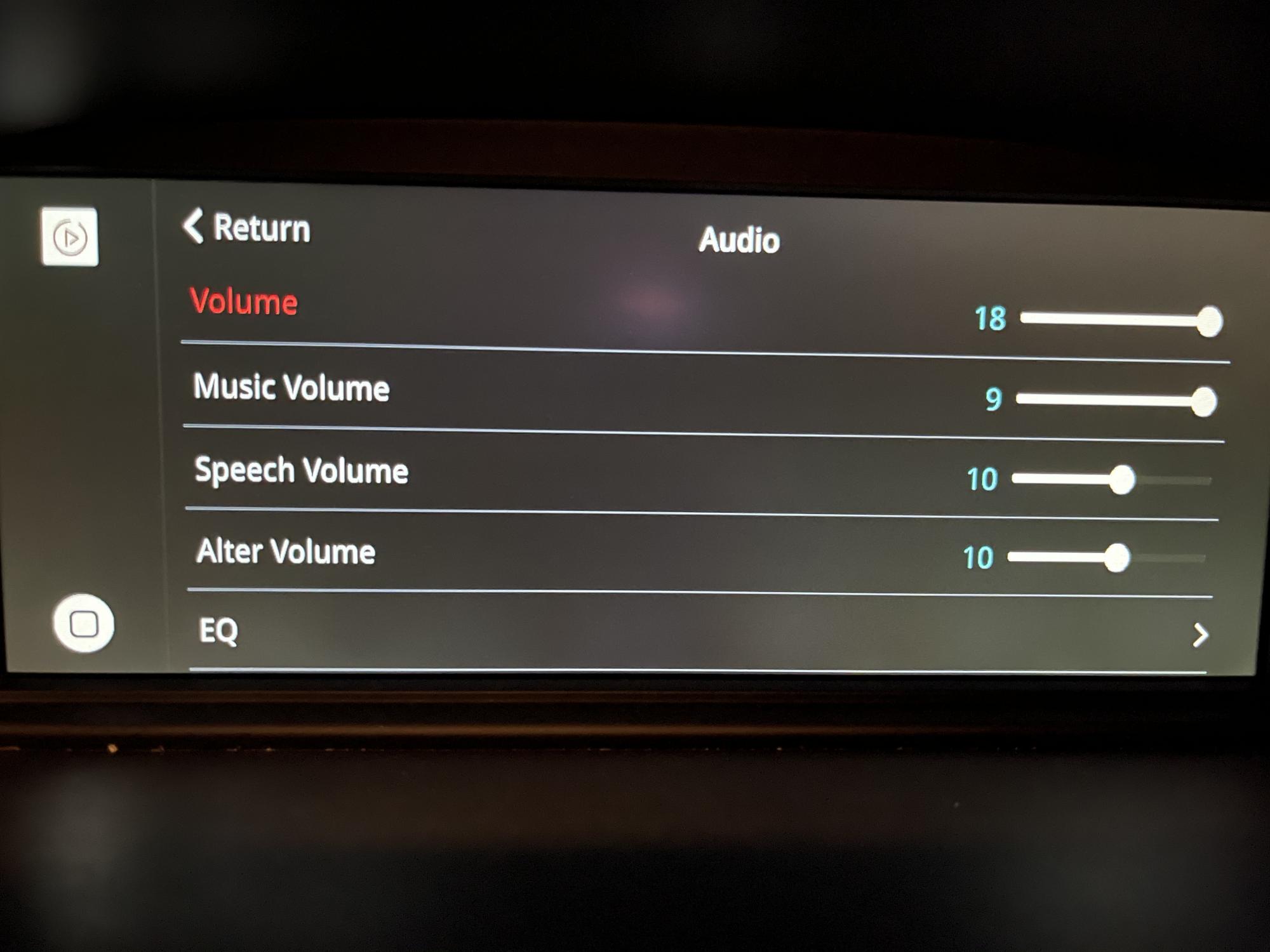
-To adjust gps/waze guidance volume, go to the audio settings of the unit and change "Alter Volume". My settings below:
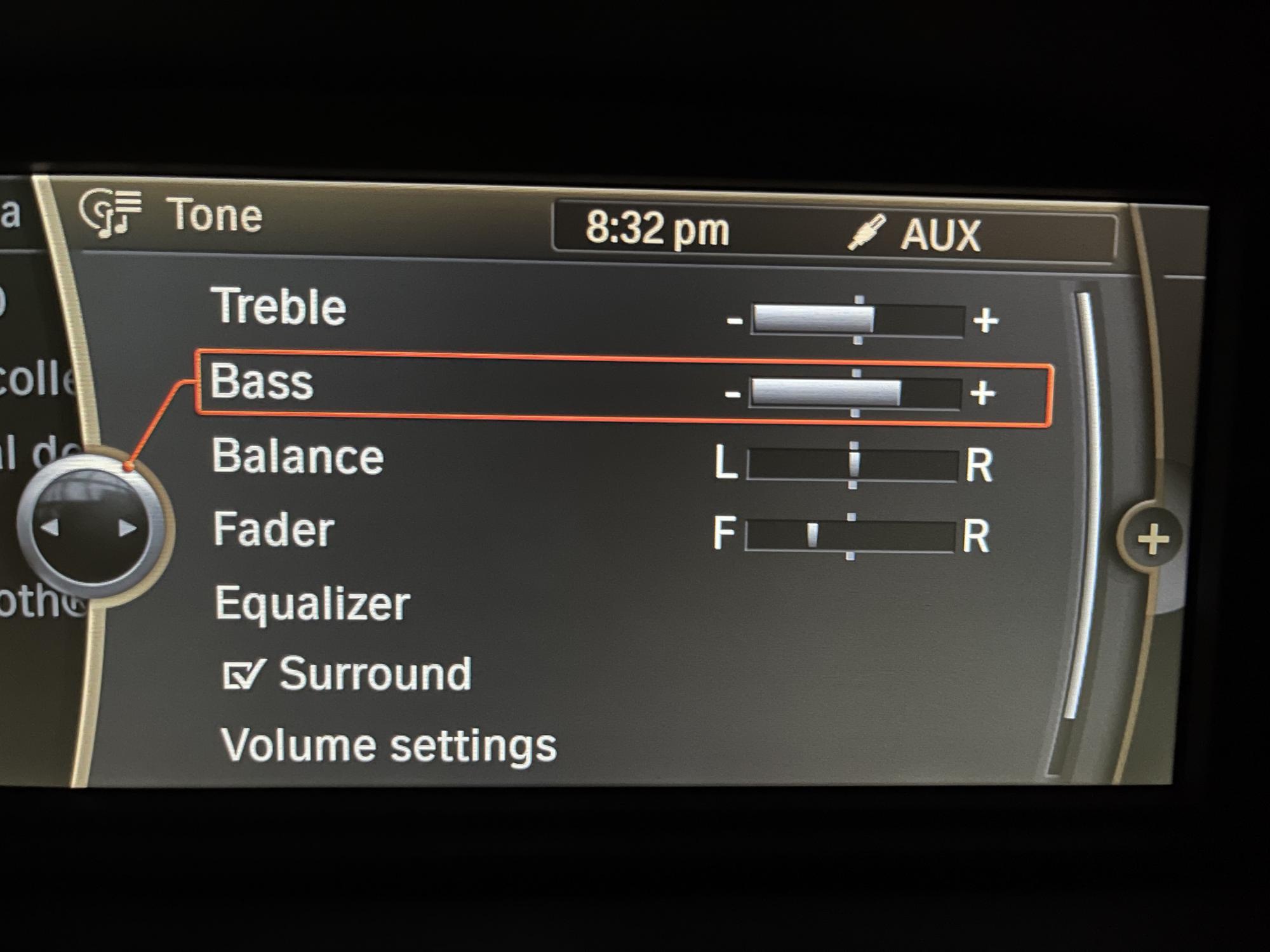
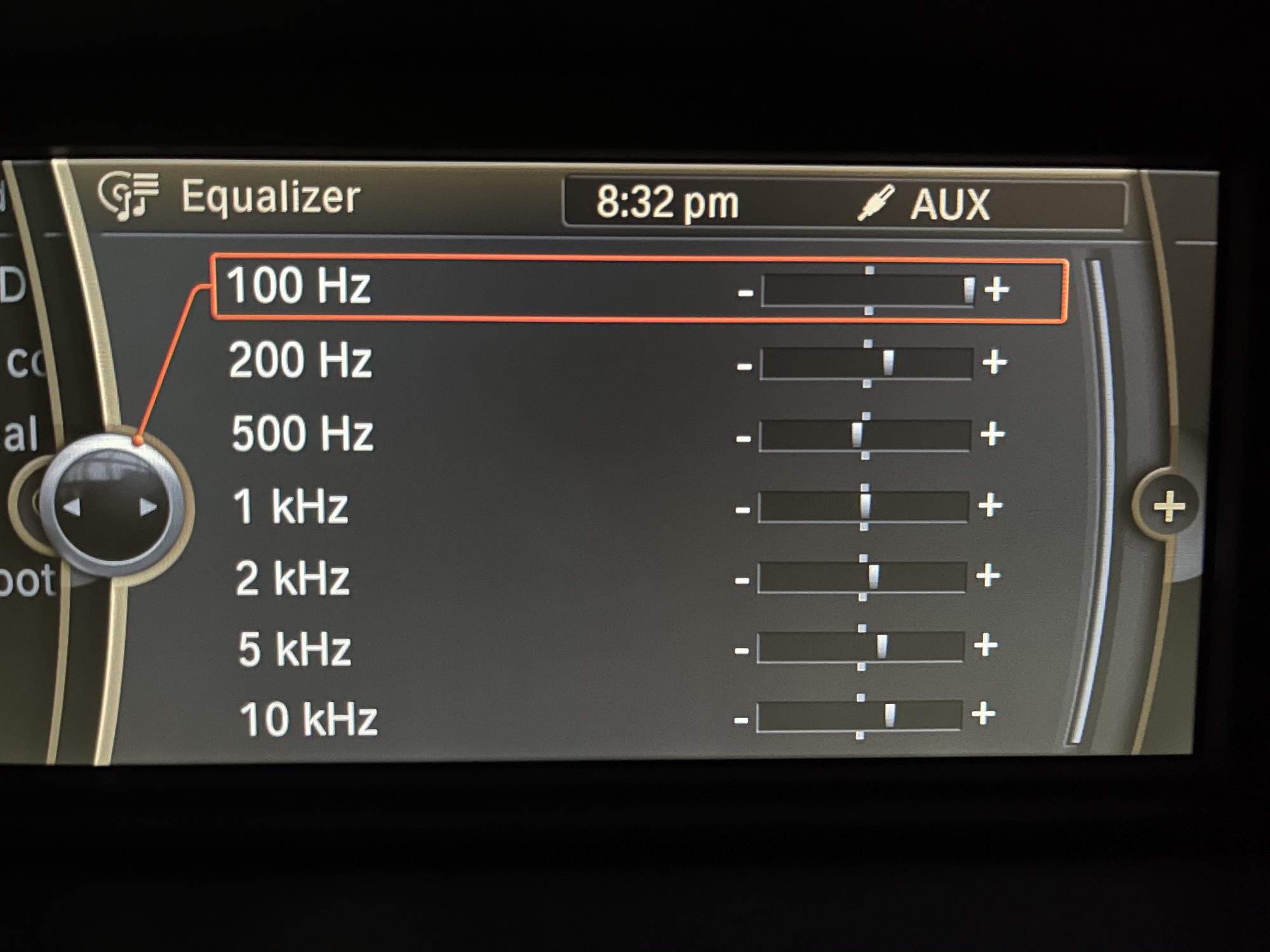
-EQ is a work in progress, but I did realize that leaving the unit EQ standard and adjusting on iDrive is way better and with less distortion:
Cheers!
Couple extra tips I found:
-To adjust gps/waze guidance volume, go to the audio settings of the unit and change "Alter Volume". My settings below:
-EQ is a work in progress, but I did realize that leaving the unit EQ standard and adjusting on iDrive is way better and with less distortion:
Cheers!
alwaysgoing wroteGood tips/observations!Hey guys, I'm new here and proud new owner of a '13 M3 E92!
Couple extra tips I found:
-To adjust gps/waze guidance volume, go to the audio settings of the unit and change "Alter Volume". My settings below:
-EQ is a work in progress, but I did realize that leaving the unit EQ standard and adjusting on iDrive is way better and with less distortion:
Cheers!

Curious? My understanding was the CarPlay unit was independent of iDrive with CarPlay audio not impacted by iDrive settings [i.e. bass, treble, eq].
Appreciate to hear more insights on this topic...
smokinjoe64 wroteThe Carplay box has its own EQ, but it is not independent.Good tips/observations!
Curious? My understanding was the CarPlay unit was independent of iDrive with CarPlay audio not impacted by iDrive settings [i.e. bass, treble, eq].
Appreciate to hear more insights on this topic...
Your BMW treats the Carplay box as an aux audio source. The output of that source is driven by the Carplay module.
I found that leaving the BMW EQ set a way that made my other audio sources sound good meant the Carplay box required it's own tweaks. If you only use Carplay as an audio source then maybe that's not a concern.
Cyberdemon wroteUnderstood and makes sense.The Carplay box has its own EQ, but it is not independent.
Your BMW treats the Carplay box as an aux audio source. The output of that source is driven by the Carplay module.
I found that leaving the BMW EQ set a way that made my other audio sources sound good meant the Carplay box required it's own tweaks. If you only use Carplay as an audio source then maybe that's not a concern.
I haven't installed CarPlay yet, "sounds" like the iDrive eq may be the best tuning source with the DSP/amp more closely integrated...some experimentation, tweaking ahead.
Just wondering if anyone is having issues with the CarPlay module sometimes connects quickly ie as soon as you start the car, other times it either takes a long time or does not connect at all.
It seems to be fine when you do a manual "CarPlay" off-on from the iPhone settings, it connects almost instantly.
Also does anyone know what the latest Firmware / MCU version is for Carsara?. Ta
It seems to be fine when you do a manual "CarPlay" off-on from the iPhone settings, it connects almost instantly.
Also does anyone know what the latest Firmware / MCU version is for Carsara?. Ta
alwaysgoing wroteYou're a genius! The nav volume was so annoying.Hey guys, I'm new here and proud new owner of a '13 M3 E92!
Couple extra tips I found:
-To adjust gps/waze guidance volume, go to the audio settings of the unit and change "Alter Volume". My settings below:
-EQ is a work in progress, but I did realize that leaving the unit EQ standard and adjusting on iDrive is way better and with less distortion:
Cheers!
satianv wroteMy observation is that I most often notice the unit connecting quickly based on when I last used my phone and when the carsara box boots.Just wondering if anyone is having issues with the CarPlay module sometimes connects quickly ie as soon as you start the car, other times it either takes a long time or does not connect at all.
It seems to be fine when you do a manual "CarPlay" off-on from the iPhone settings, it connects almost instantly.
Also does anyone know what the latest Firmware / MCU version is for Carsara?. Ta
If the box has had time to power up and I am on the phone, it'll pair to bluetooth really quickly and will be ready by the time I get the car started up. EX I unlock the car with the keyfob, stick some stuff in the trunk, get in and start it.
If I open the car through comfort access, start the car right up and get ready to go - then the box won't necessarily boot by the time I'm ready to go, and the fastest fix is just to go into Bluetooth and tap the Carsara box. As soon as I do that it knows to pair and pops right up.
Minor nuisance, but truthfully this happens in my X5 too, I think it has more to do with how frequently the phone is searching for new BT sources while in the background.
Hey guys,
I still can not choose between de Carsara and the Kremersino.
So one more question to finally help me to make a decision:
Is it possible to mirror you (iPhone) screen wireless to the Carsara unit?
The Kremersino claims it can, see this video at 07:55.
Hope you have the answer!
Thanks in advance!
I still can not choose between de Carsara and the Kremersino.
So one more question to finally help me to make a decision:
Is it possible to mirror you (iPhone) screen wireless to the Carsara unit?
The Kremersino claims it can, see this video at 07:55.
Hope you have the answer!
Thanks in advance!
FloorBeamer wroteYes it's possible, my personal experience for the Carsara though is it is a bit of a pain in the ass because of how the iPhone handles hopping between the two. If you want to frequently switch between mirroring and Carplay it's not ideal, but remember that these boxes are almost all using the same basic GPLink architecture so the capabilities are all basically the same with some slightly different UI.Hey guys,
I still can not choose between de Carsara and the Kremersino.
So one more question to finally help me to make a decision:
Is it possible to mirror you (iPhone) screen wireless to the Carsara unit?
The Kremersino claims it can, see this video at 07:55.
Hope you have the answer!
Thanks in advance!
In my case it was easier to pair my Android device when I wanted to watch a video and leave Carplay enabled by default than it was to forget the carplay settings and switch to Airplay.
Cyberdemon wroteHey Cyberdemon,Yes it's possible, my personal experience for the Carsara though is it is a bit of a pain in the ass because of how the iPhone handles hopping between the two. If you want to frequently switch between mirroring and Carplay it's not ideal, but remember that these boxes are almost all using the same basic GPLink architecture so the capabilities are all basically the same with some slightly different UI.
In my case it was easier to pair my Android device when I wanted to watch a video and leave Carplay enabled by default than it was to forget the carplay settings and switch to Airplay.
Thanks for sharing your experiences with the Carsara!
I saw the difficulty with switching between CarPlay and mirroring as you mentioned popping up on different fora as wel. Same for every brand.
As you said: all boxes are roughly the same. The Kremersino advertises with an audio chip that should output lossless audio:
“ DSP Amplifier Chip
Using DSP chip, enjoy the lossless sound quality of the original car”
That would be the only reason left to choose them but maybe it is just a (commercial) way to distinguish themself from the rest?
Thanks again!
