

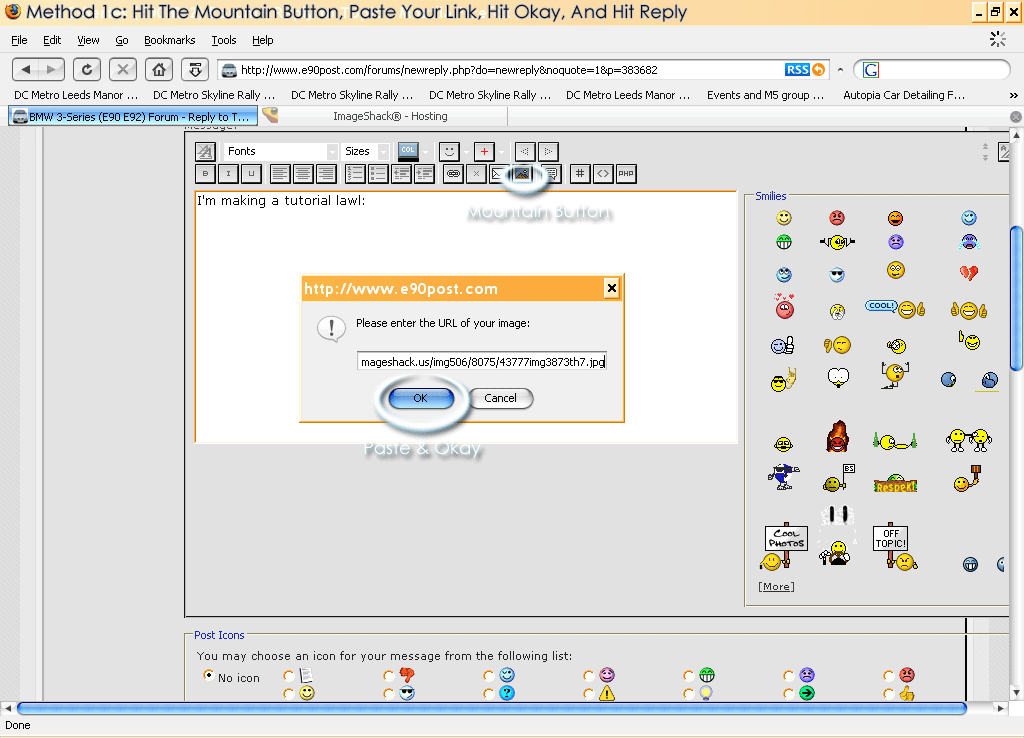
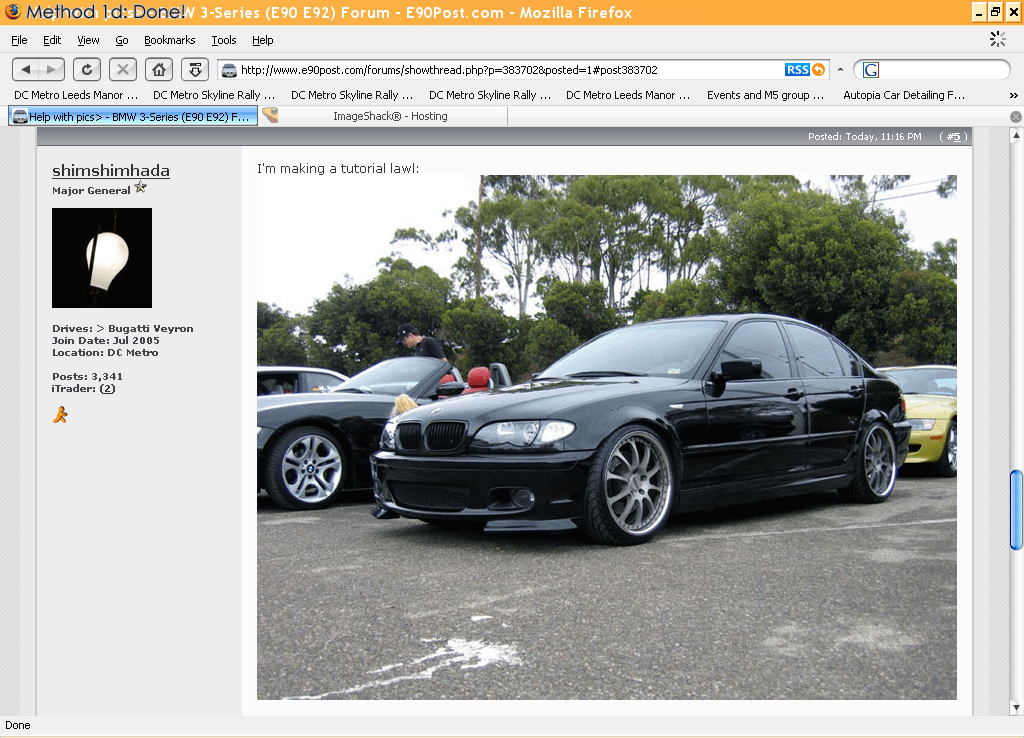
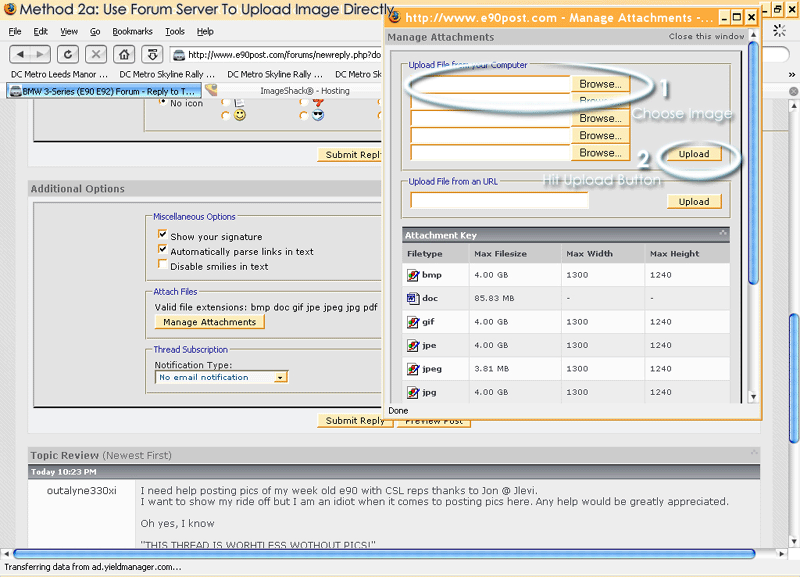
Sticky FTW: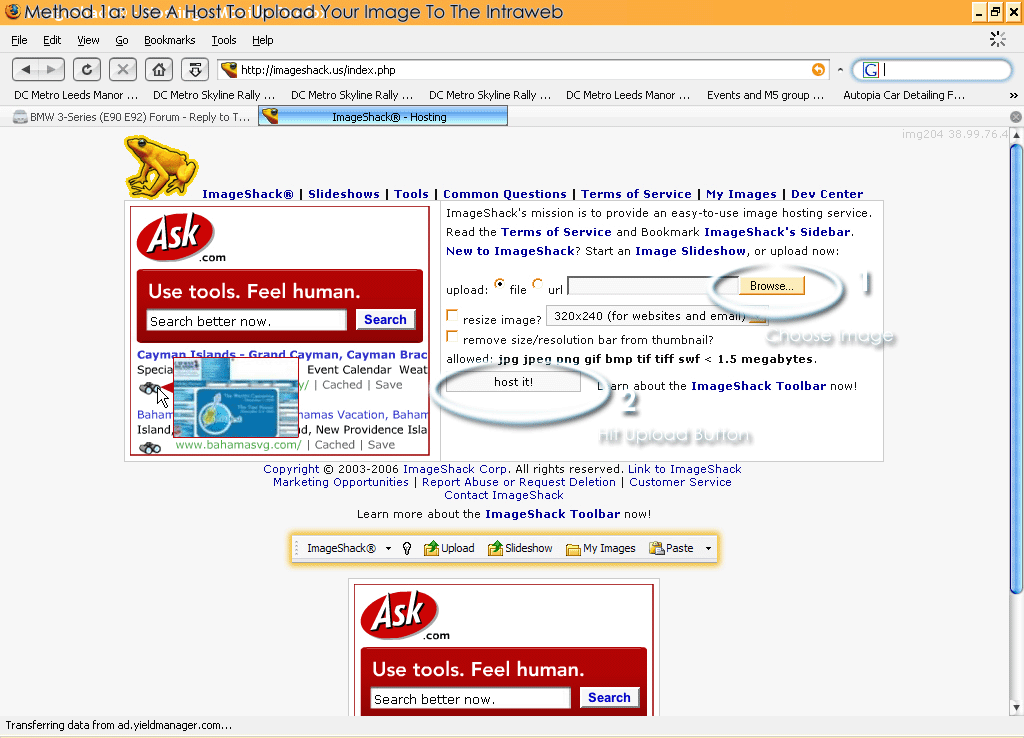



696.9KVIEWS
33REPLIES
0APPRECIATES
04-27-2020LAST POST
Damn Noobs!
diesel007 wroteAs a Major General, I felt obligated to donate something to the community.Damn Noobs!
I still don't have an E90.
I think this deserves a sticky, GJ on the tutorial =]
Thanks for the info man!
I always use the forum to upload the picts.........this way takes longer!!!

I always use the forum to upload the picts.........this way takes longer!!!
NaTuReB0Y wroteI listed both ways.Thanks for the info man!
I always use the forum to upload the picts.........this way takes longer!!!

At least you can quote non-forum pictures properly.
Its not so good to quote pictures, especially when people are on 56k, they saw they load the picture 1 time, why make them load it again? (if its on a different page)..
I'd recomend people to take out the IMG tags in quotes, that way theres less scrolling and less loading =]
I'd recomend people to take out the IMG tags in quotes, that way theres less scrolling and less loading =]
Caster wroteI forgot people are still on ancient lines.Its not so good to quote pictures, especially when people are on 56k, they saw they load the picture 1 time, why make them load it again? (if its on a different page)..
I'd recomend people to take out the IMG tags in quotes, that way theres less scrolling and less loading =]
shimshimhada wrotehey.....how did you take a pic of your computer screen for the tutorial?I forgot people are still on ancient lines.
i'm new to PC.....pretty much PC illiterate!
Why do people use third party picture hosts anyway? It's annoying because when you search old threads the pic links are often dead.
NaTuReB0Y wroteLike this:hey.....how did you take a pic of your computer screen for the tutorial?
i'm new to PC.....pretty much PC illiterate!
findtom wroteAgreed, we encourage people to upload their pics directly into their posts. This way the images are saved on our servers and will be preserved permanently.Why do people use third party picture hosts anyway? It's annoying because when you search old threads the pic links are often dead.

ksfrogman wroteBut how???Like this:
NaTuReB0Y wrotehit Print-Screen key on your keyboard, then open up an image editor (paint, photoshop, etc..) and paste it (ctrl-v) into a new image.But how???
Ctrl-Print Screen or Print Screen?
Hey it works!!

Hey it works!!
Jason wrotethanks man! gotta buy a PC book for Dummies........hit Print-Screen key on your keyboard, then open up an image editor (paint, photoshop, etc..) and paste it (ctrl-v) into a new image.
I was just messing with you Kevin.
When you press the Print Screen button, it copies what's on your screen to your clipboard. So now you can record some of your high scores when you play Casino online.
When you press the Print Screen button, it copies what's on your screen to your clipboard. So now you can record some of your high scores when you play Casino online.
If you press alt+printscreen, then you only capture the highlighted window.
I'm trying to post pics by a tired part, Imageshack, by useing method 1a, but it doesa't work!!!!!!!!!!!!:mad:
thanks........
mazz
mazz
If you have a photo on your computer that you want to send to another member via a PM, how do you include it into the message? The Manage Attachments button isn't available with PMs.
ThanX, that was good stuff
