
12.5KVIEWS
17REPLIES
5APPRECIATES
04-09-2026LAST POST
I have decided to use OEM Base Plate + Snap In adapter to use iPhone Apps and Video on my vehicle. I was using the iPhone Video cable which was completely fine. I just wanted to have that OEM look. Now everything works perfectly fine.

I decided to share this here since there is good amount of Base Plate + Snap In adapters made for the same phone.

They have 3 version.

1- Charging Only
2- Music + App
3- Music + App + Video

The base plate also has couple versions and not all of them has additional wiring harness to play video.

Here is the parts i have used.

Base Plate : 84109239396 (Supports Audio + Apps + Video)
Snap In Adapter : 84212298308 (Latest Version / Supports Audio + Apps + Video)

This car is just so awesome since all the prewiring done for several modules and retrofits. I was wondering where i would find the additional signal booster fakra. Well it was right next to the Base Plate factory Plug.

It is not because i am using iphone 4s to have phone calls but nice to see all necessary cables in there to unlock all the functions.

I have already had FBAS 3 hooked up to 6NF Before. It made my life alot easy to put the cables in place.

The Base Plate plug has 18 pin socket from the factory under the hand brake boot. Power cable was already placed. Because i had TCU before, some pins also were from the TCU like pin 16. But since i am on combox now, that cable really not needed.

I have bought addional AUX-IN USB with factory AUX cable before. I simply removed my original AUX-IN USB from the arms rest, and parallel wired the additional AUX cable. Basically split the wires.

Then i extended all the way to Base Plate Plug. There is a wiring diagram for e70 base plate which shows AUX-IN to Base Plate pinout. But that one is completely wrong.

I have pulled E9x TCU wiring diagram and that one shows the correct info for Base Plate Audio.
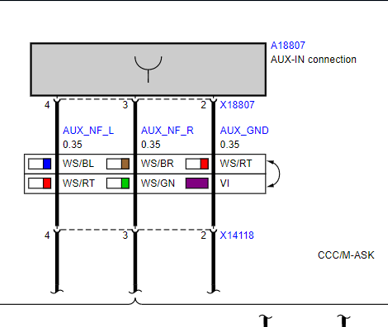
Attached image

On your AUX-IN Audio connector :

Pin 1 : Shield
Pin 2 : Ground
Pin 3 : AUX_NF_R
Pin 4 : AUX_NF_L

On your base plate factory 18 Male Pin Connector :

Pin 11 : Shield
Pin 4 : Ground
Pin 12 : AUX_NF_R
Pin 3 : AUX_NF_L

I have used Pin 19(+)-25(Shield)-26(-) for the Video (wert_23) Since FBAS1 for the OEM Camera and FBAS2 for the OEM TV Module.

You want to place the FBAS Cable on the 18 plate connector in this order :

Pin 6 - Video +
Pin 7 - Video -
Pin 15 - Shield

Because i already had 6NF before, i had the blue Fakra cable under the arm rest area. If you dont have already you can order this, and run all the way to base plate blue fakra.

This Application requires 6NR on CIC which means 9C Certificate. If you have this certificate you will need to code your CIC and Combox. You can simply add 6NR and 6NF to your VO and default code CIC and MEDIA. You will gain Snap In and PlugIn Option under CD/Multimedia - External Devices.

When you default code with this option one thing will not work properly which is the Video and Audio. The reason is Default code makes the MEDIA USB2_IPOD_AUDIO line from ANALOG to "DIGITAL" because we re using ANALOG sound with ANALOG Video. You will need to change this line to ANALOG. With this setting Video will match with sound.

After this you are all set. The Snap In came with little fan. As soon as phone inserted, it start running. You can barely hear the fan when the arm rest open, And it completely becomes silence after armrest closed.

I have bought all brandnew parts. And while i am doing this project i also used Easy OFF Oven Cleaner to clean all the vinyl paint from the inside. It literally became brandnew.

This is the best Snap In and Best Phone for the CIC since it provides Apps and Video Option.

Image hosted on: i.ibb.co
Subscribing to this as I am attempting to do this mod with iPhone 4S and video playback to CIC with COMBOX.
I did this a few years back myself. Best little mod if you drive a lot. I basically use my iPhone 4s as a video storage and watch my iTunes movies. Add in TV option to your VO and you can add a Roku with composite outs and get TV as well as better apps. Mlap timer works great too and is still in Apple Store as I recall.
I think my issue is coding the "MEDIA USB2_IPOD_AUDIO" from DIGITAL to ANALOG. I haven't verified this yet...

My COMBOX has the USB to going into the BLACK FAKRA on the back. Nothing is populated on the BLUE FAKRA. Also, I made sure to have the coding set to BOTH.
Right...so I have ordered the parts for video playback after seeing a YT movie about it, that used a Mini's USB with AV-in port.

So the parts included that and the FBAS cable to connect it to the CIC.

But so I understand this topic correctly? Instead of running it to the USB AV-in, I can (also) fit it directly to the Snap-in adapter's baseplate?

That could have saved my the AV-in USB port and media cable, but oh well...
MParallel wrote
Right...so I have ordered the parts for video playback after seeing a YT movie about it, that used a Mini's USB with AV-in port.

So the parts included that and the FBAS cable to connect it to the CIC.

But so I understand this topic correctly? Instead of running it to the USB AV-in, I can (also) fit it directly to the Snap-in adapter's baseplate?

That could have saved my the AV-in USB port and media cable, but oh well...
Correct you can use the fakra to attach the media snap in.. I have both fakra taken. 1 for the armrest usb one for the media.
So looking around for the parts. Everything is on order. Now looking for the snap-in adapter as mine came with an iphone 5 version (which holds my Iphone SE nciely).

Looking at the 4/4S media adapters

"Snap In Adapter : 84212298308", latest version. I see there is a second version, also listed as "From 2/2012" with PN 84212298309.

Also listed as 4/4s Media version, but lacking the little cooling fan and such. Both can be had new and cheap now from some outlets, so wondering which version I should take.
SaNGRia wrote
Correct you can use the fakra to attach the media snap in.. I have both fakra taken. 1 for the armrest usb one for the media.
Not sure I understand the fakra cable. Everything is already in my car. Baseplate/snap-in adapter (althouhg not correct version), but from my understanding it was to run the FBAS cable from CIC to the baseplate connector versus running it to the USB AV-in port so it directly connects. (or split the FBAS so it goes into both the USB port and the baseplate).

I don't see any Fakra connectors in this scenario.
MParallel wrote
Not sure I understand the fakra cable. Everything is already in my car. Baseplate/snap-in adapter (althouhg not correct version), but from my understanding it was to run the FBAS cable from CIC to the baseplate connector versus running it to the USB AV-in port so it directly connects. (or split the FBAS so it goes into both the USB port and the baseplate).

I don't see any Fakra connectors in this scenario.
The Baseplate with media has blue fakra addition to black fakra which is for signal booster. Blue fakra should be connected to combox. With that you can have iPhone apps and video running. If you only connect the fbas with aux and base plate then you are by passing combox connection which will not allow you to access video or iPhone apps. Combox is the one makes this functionalities to be activated.
I see.

The YT video shows just the installation of the AV-in USB port and the FBAS cable from this port to back of CIC. Then with the media cable he has the iphone as video storage and playback on the CIC.

It's not even about the snap-in adapter. I only learned that from this topic.

All the fakra connections on my Combox have cable attached. So maybe everything is already in place. Of course still need that FBAS cable to connect to CIC.
If all the fakra is occupied i think you are good on that. Just do the FBAS and code it.
SaNGRia wrote
If all the fakra is occupied i think you are good on that. Just do the FBAS and code it.
Nice.

Waiting for the parts. It'll be some time before it's all installed, but no rush.
Found this pic in another topic.
It could have been a pic of my own car as it's identical, bar that little reed switch left of the combox that the other topic is about (which is just shown, not its original location)

Image hosted on: www.1addicts.com
SaNGRia wrote
If all the fakra is occupied i think you are good on that. Just do the FBAS and code it.
You any idea, you seem to know this stuff.

Today I tested the Iphone 5 snap-in adapter that is in mine (With an iPhoneSE just to be complete).

It connected fine (although did seem to dis/reconnect a few time) I could see the songs on the phone being displayed on the CIC, I could also play songs, but the audio came staright from the iPhone itself.

Would this need the Media version of the snap-in adapter?

Just wondering, as I'm going to get the FBAS cable/iphone 4/4SE snap-in to have the video option, but it just messes up my mind. Specially now I'm also looking into coding and there are so many Aux/USB/video settings.

I also just learned there are 3 FBAS connection options on the rear of the CIC. Instead if spliiting the cable to go to both AV-in USB port and the snap-in baseplate, I thought I might as well install 2 FBAS cables, each to their own dedicated input. (if of course they are still available).

My optionlist has:

Bmw Teleservices 6AA
Control Teleservices 6AB
Usb-/audio Interface 6FL
Ext.con.of The Music Play.i.mobilph 6NF
Apps 6NR
Control Combox 6VC

Any food for thought?
MParallel wrote
You any idea, you seem to know this stuff.

Today I tested the Iphone 5 snap-in adapter that is in mine (With an iPhoneSE just to be complete).

It connected fine (although did seem to dis/reconnect a few time) I could see the songs on the phone being displayed on the CIC, I could also play songs, but the audio came staright from the iPhone itself.

Would this need the Media version of the snap-in adapter?

Just wondering, as I'm going to get the FBAS cable/iphone 4/4SE snap-in to have the video option, but it just messes up my mind. Specially now I'm also looking into coding and there are so many Aux/USB/video settings.

I also just learned there are 3 FBAS connection options on the rear of the CIC. Instead if spliiting the cable to go to both AV-in USB port and the snap-in baseplate, I thought I might as well install 2 FBAS cables, each to their own dedicated input. (if of course they are still available).

My optionlist has:

Bmw Teleservices 6AA
Control Teleservices 6AB
Usb-/audio Interface 6FL
Ext.con.of The Music Play.i.mobilph 6NF
Apps 6NR
Control Combox 6VC

Any food for thought?
Make sure you get the right polarity on the FBAS whichever ones you choose. The intent is 1 FBAS is for video play back, while the other two are intended for front and rear backup camera.

On mine, I went the Y-cable route.
RocketyMan wrote
Make sure you get the right polarity on the FBAS whichever ones you choose. The intent is 1 FBAS is for video play back, while the other two are intended for front and rear backup camera.

On mine, I went the Y-cable route.
Ah that's what these are for.

I found the pinouts in another topic (X3 forum, "Coding make easy") so that should not be a problem.

And I found another topic on another forum where on one side of the FBAS cable, someone snipped off the pins and replaced them with RCA leads and uses different external devices with AV output to directly send signals to the CIC.
SaNGRia wrote
The Baseplate with media has blue fakra addition to black fakra which is for signal booster. Blue fakra should be connected to combox. With that you can have iPhone apps and video running. If you only connect the fbas with aux and base plate then you are by passing combox connection which will not allow you to access video or iPhone apps. Combox is the one makes this functionalities to be activated.
Ok so I finally bought a NOS 4/4s media snap-in adapter. I refound this topic and read posts again.

I now see I might have overlooked a detail. In the above post you are mentioning the baseplate with media having the blue fakra. I never realized you were taling baseplate, not snap-in (because of "Media").

So this could mean my baseplate is just basic and I also need a media version baseplate.
However, I do have a blue fakra connector on my combox. Or is this just a preparation and I could have a 'loose' fakra connector under my baseplate?

PS. What apps on an old iphone 4(s) do still work?

Can you play YT vids (using a browser, as the native app is long gone)?

PPS: compring pics between Baseplate 84109239396 and 84109239395 (the only one listed for my car) both have a blue fakra cable. So I can only assume this one is connected to my combox.
Haven't taken my center console apart.
84109239396 is listed for E9x models, 84109239395 for (among) E8x
So maybe they are all same spec, but just armrest specific.
Well I have to reply one more time and reading my old post made me laugh a little.

So turns out with my factory options. All the hardware was already in place. Specially after getting the correct Media snap-in adapter.

Now after reading more topics and AI chats then I’d like to admit, in the end the secret was all in the coding. For mine to work I actually had to code the Snap-in USB2_ipod_audio to “digital”.
Maybe other parameter setting made this requirement. There are too many USB/Audio/Video/Aux/ipod related parameters in CIC and ComBox coding files.

Now everything works and since it’s coded to digital,
No digital-to-analog conversion comes into play. I get the crispest sound possible for audio (over MOST bus) combined with analog video signal, which is analog only.
Shows all the info and album art.
When using plugin mode, you get this very cool iPod out UI that I didn’t know existed until recently, which makes me feel stupid, owning this car for well over a year. Even the owners manual doesn’t explicitly mention this.
It’s literally an iPod projected on the screen, output by the iPhone 4 over its analog video output.

Being so deep into this project, I also re-tested my Connect lightning snap-in.
Call me fooled “Connect” surely meant the most basic version to me, you know, it connects the phone. Only to just have learned it’s Base+Media+Video, albeit for the NBT. But since my coding is now set to digital, the audio is routed to the CIC perfectly fine. Now I understand this didn’t work before and it just used the phone’s speaker.

Then as my final test I got the CIC Media Snap-in lightning version, as this has additional DAC hardware. Unfortunately unlike what BMW seems to have marketed it at, there is no DAC going in for the video signal. So it’s audio only.
I even tried an old Spotify app and lo and behold, I finally got to see the Spotify app under BMW apps and had full Spotify menu, artwork, the lot.

Sure you can just fit an MMi and be done with, but not having useless hardware in the car is very nice.
