
I have decided to use OEM Base Plate + Snap In adapter to use iPhone Apps and Video on my vehicle. I was using the iPhone Video cable which was completely fine. I just wanted to have that OEM look. Now everything works perfectly fine.
I decided to share this here since there is good amount of Base Plate + Snap In adapters made for the same phone.
They have 3 version.
1- Charging Only
2- Music + App
3- Music + App + Video
The base plate also has couple versions and not all of them has additional wiring harness to play video.
Here is the parts i have used.
Base Plate : 84109239396 (Supports Audio + Apps + Video)
Snap In Adapter : 84212298308 (Latest Version / Supports Audio + Apps + Video)
This car is just so awesome since all the prewiring done for several modules and retrofits. I was wondering where i would find the additional signal booster fakra. Well it was right next to the Base Plate factory Plug.
It is not because i am using iphone 4s to have phone calls but nice to see all necessary cables in there to unlock all the functions.
I have already had FBAS 3 hooked up to 6NF Before. It made my life alot easy to put the cables in place.
The Base Plate plug has 18 pin socket from the factory under the hand brake boot. Power cable was already placed. Because i had TCU before, some pins also were from the TCU like pin 16. But since i am on combox now, that cable really not needed.
I have bought addional AUX-IN USB with factory AUX cable before. I simply removed my original AUX-IN USB from the arms rest, and parallel wired the additional AUX cable. Basically split the wires.
Then i extended all the way to Base Plate Plug. There is a wiring diagram for e70 base plate which shows AUX-IN to Base Plate pinout. But that one is completely wrong.
I have pulled E9x TCU wiring diagram and that one shows the correct info for Base Plate Audio.
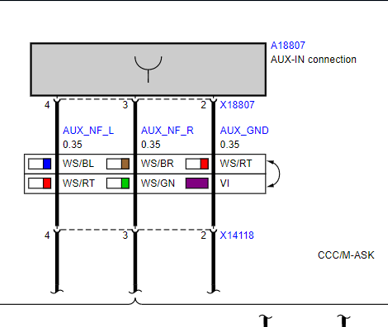
On your AUX-IN Audio connector :
Pin 1 : Shield
Pin 2 : Ground
Pin 3 : AUX_NF_R
Pin 4 : AUX_NF_L
On your base plate factory 18 Male Pin Connector :
Pin 11 : Shield
Pin 4 : Ground
Pin 12 : AUX_NF_R
Pin 3 : AUX_NF_L
I have used Pin 19(+)-25(Shield)-26(-) for the Video (wert_23) Since FBAS1 for the OEM Camera and FBAS2 for the OEM TV Module.
You want to place the FBAS Cable on the 18 plate connector in this order :
Pin 6 - Video +
Pin 7 - Video -
Pin 15 - Shield
Because i already had 6NF before, i had the blue Fakra cable under the arm rest area. If you dont have already you can order this, and run all the way to base plate blue fakra.
This Application requires 6NR on CIC which means 9C Certificate. If you have this certificate you will need to code your CIC and Combox. You can simply add 6NR and 6NF to your VO and default code CIC and MEDIA. You will gain Snap In and PlugIn Option under CD/Multimedia - External Devices.
When you default code with this option one thing will not work properly which is the Video and Audio. The reason is Default code makes the MEDIA USB2_IPOD_AUDIO line from ANALOG to "DIGITAL" because we re using ANALOG sound with ANALOG Video. You will need to change this line to ANALOG. With this setting Video will match with sound.
After this you are all set. The Snap In came with little fan. As soon as phone inserted, it start running. You can barely hear the fan when the arm rest open, And it completely becomes silence after armrest closed.
I have bought all brandnew parts. And while i am doing this project i also used Easy OFF Oven Cleaner to clean all the vinyl paint from the inside. It literally became brandnew.
This is the best Snap In and Best Phone for the CIC since it provides Apps and Video Option.


I decided to share this here since there is good amount of Base Plate + Snap In adapters made for the same phone.
They have 3 version.
1- Charging Only
2- Music + App
3- Music + App + Video
The base plate also has couple versions and not all of them has additional wiring harness to play video.
Here is the parts i have used.
Base Plate : 84109239396 (Supports Audio + Apps + Video)
Snap In Adapter : 84212298308 (Latest Version / Supports Audio + Apps + Video)
This car is just so awesome since all the prewiring done for several modules and retrofits. I was wondering where i would find the additional signal booster fakra. Well it was right next to the Base Plate factory Plug.
It is not because i am using iphone 4s to have phone calls but nice to see all necessary cables in there to unlock all the functions.
I have already had FBAS 3 hooked up to 6NF Before. It made my life alot easy to put the cables in place.
The Base Plate plug has 18 pin socket from the factory under the hand brake boot. Power cable was already placed. Because i had TCU before, some pins also were from the TCU like pin 16. But since i am on combox now, that cable really not needed.
I have bought addional AUX-IN USB with factory AUX cable before. I simply removed my original AUX-IN USB from the arms rest, and parallel wired the additional AUX cable. Basically split the wires.
Then i extended all the way to Base Plate Plug. There is a wiring diagram for e70 base plate which shows AUX-IN to Base Plate pinout. But that one is completely wrong.
I have pulled E9x TCU wiring diagram and that one shows the correct info for Base Plate Audio.
On your AUX-IN Audio connector :
Pin 1 : Shield
Pin 2 : Ground
Pin 3 : AUX_NF_R
Pin 4 : AUX_NF_L
On your base plate factory 18 Male Pin Connector :
Pin 11 : Shield
Pin 4 : Ground
Pin 12 : AUX_NF_R
Pin 3 : AUX_NF_L
I have used Pin 19(+)-25(Shield)-26(-) for the Video (wert_23) Since FBAS1 for the OEM Camera and FBAS2 for the OEM TV Module.
You want to place the FBAS Cable on the 18 plate connector in this order :
Pin 6 - Video +
Pin 7 - Video -
Pin 15 - Shield
Because i already had 6NF before, i had the blue Fakra cable under the arm rest area. If you dont have already you can order this, and run all the way to base plate blue fakra.
This Application requires 6NR on CIC which means 9C Certificate. If you have this certificate you will need to code your CIC and Combox. You can simply add 6NR and 6NF to your VO and default code CIC and MEDIA. You will gain Snap In and PlugIn Option under CD/Multimedia - External Devices.
When you default code with this option one thing will not work properly which is the Video and Audio. The reason is Default code makes the MEDIA USB2_IPOD_AUDIO line from ANALOG to "DIGITAL" because we re using ANALOG sound with ANALOG Video. You will need to change this line to ANALOG. With this setting Video will match with sound.
After this you are all set. The Snap In came with little fan. As soon as phone inserted, it start running. You can barely hear the fan when the arm rest open, And it completely becomes silence after armrest closed.
I have bought all brandnew parts. And while i am doing this project i also used Easy OFF Oven Cleaner to clean all the vinyl paint from the inside. It literally became brandnew.
This is the best Snap In and Best Phone for the CIC since it provides Apps and Video Option.
